
Frequency Maker
A tone generator plays a sound at an exact frequency — useful for tuning, testing speakers and headphones, checking your hearing range, science lessons and sound design. This one runs in your browser: set a frequency, choose a waveform, sweep across a range or play musical notes, and download what you hear as a WAV file. Start with the volume low.
- Free to use
- No sign-up
- Runs in your browser
Tone and frequency generator
Sound and Frequency Reference Pack
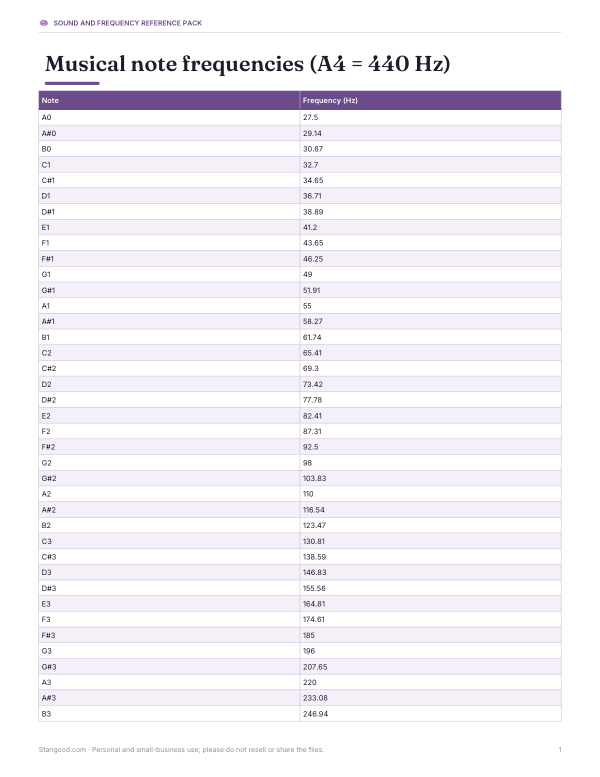
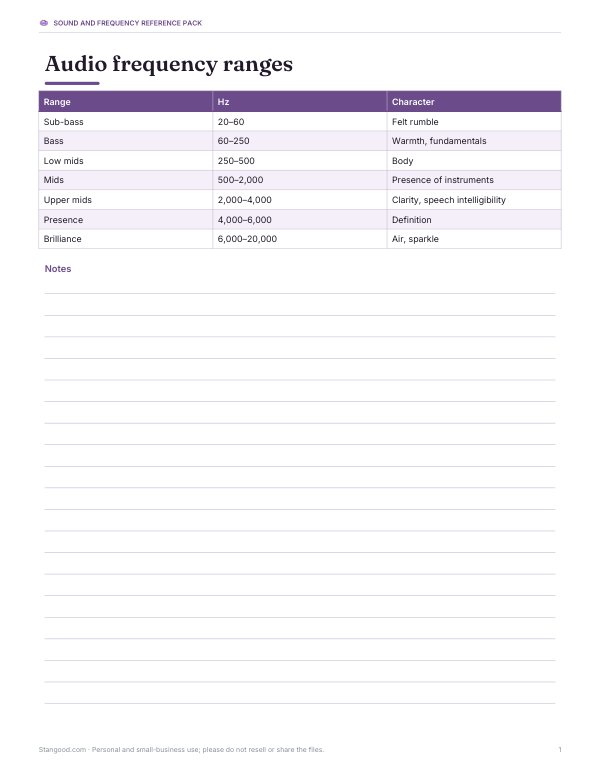
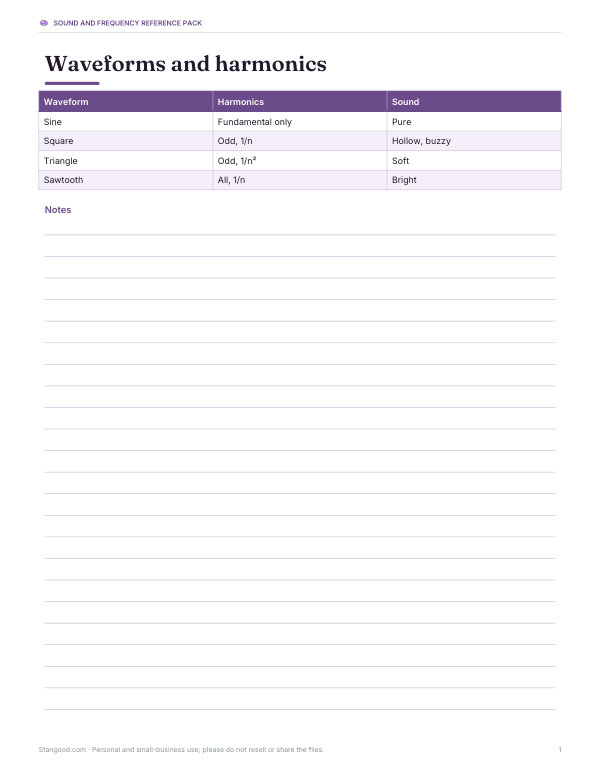
Printable audio reference: note frequency chart (A0–C8), audio frequency ranges chart, waveform and harmonics reference and a speaker test log.
- Note frequency chart (PDF/XLSX)
- Frequency ranges (PDF)
- Waveform reference (PDF)
- Speaker test log (PDF/DOCX/XLSX)
Formats: PDF, XLSX, DOCX. Instant download after payment (link valid 72 hours, up to 5 downloads). AI-assisted: the templates were drafted with AI help and reviewed and laid out before publishing.
$5.00 USD, one-time 4 files · about $1.25 each
- Instant download
- 7-day refund
- Secure checkout by Stripe
7-day money-back guarantee. Full refund within 7 days of purchase, even after you download.
Free sample: Audio Frequency Ranges (PDF, 60 KB)
Full refund within 7 days — see the refund policy and license.
Free printables
Single sheets you can print right now, no sign-up. The full pack adds every sheet in one download plus the editable files.
 Printable Speaker Test Log
Frequency, pitch and hearing
| Frequency | What it sounds like / is used for |
|---|---|
| 20–60 Hz | Deep sub-bass; felt as much as heard |
| 60–250 Hz | Bass; the fundamental of many voices and instruments |
| 440 Hz | A4, the standard tuning pitch |
| 1,000 Hz | A common reference tone for audio testing |
| 2,000–5,000 Hz | Where human hearing is most sensitive |
| 8,000–12,000 Hz | Brightness and “air”; hearing here declines with age |
| 15,000–20,000 Hz | Upper limit of young adult hearing |
The commonly quoted range of human hearing is about 20 Hz to 20 kHz, but the upper limit falls with age and noise exposure. Speakers and headphones also have their own limits, especially at very low and very high frequencies.
Waveforms
| Wave | Sound | Harmonics |
|---|---|---|
| Sine | Pure, smooth | None — a single frequency |
| Square | Hollow, buzzy (like old video games) | Odd harmonics, falling at 1/n |
| Triangle | Soft, flute-like | Odd harmonics, falling at 1/n² |
| Sawtooth | Bright, brassy | All harmonics, falling at 1/n |
The oscilloscope under the controls shows the waveform you’re playing. Square and sawtooth waves sound louder than a sine at the same setting because of their harmonics — keep the volume low when switching.
Beats and binaural beats
Two tones at slightly different frequencies interfere, producing a slow rise and fall in loudness called beats; the beat rate equals the difference in frequency. Tuners use this: when two strings sound together, the beating slows and stops as they come into tune. Setting a right-ear offset plays slightly different tones in each ear, which with headphones creates the perception called binaural beats. Claims about binaural beats changing mood or brainwaves are not well established; use them as an audio curiosity.
Worked example: finding your hearing range
With headphones at a low, comfortable volume, press Sweep. The tone rises from 20 Hz to 20 kHz over 20 seconds, and the frequency display updates as it goes. Note the frequency where you stop hearing it — many adults stop somewhere between about 12 and 17 kHz. Repeat with the slider for a more careful check around that point. This is not a medical hearing test; if you notice hearing loss or ringing, see a hearing professional.
Frequency and musical pitch
Musical notes are frequencies: each octave doubles the frequency (A3 is 220 Hz, A4 is 440 Hz, A5 is 880 Hz), and each of the 12 semitones in equal temperament multiplies it by the twelfth root of two, about 1.0595. The note list covers the 88 keys of a piano, from A0 at 27.5 Hz to C8 at about 4,186 Hz. The display also shows how many cents (hundredths of a semitone) any frequency is from the nearest note, useful for checking tuning.
Resonance and standing waves
Every object and room has frequencies at which it vibrates most easily. Sweeping a tone through a room’s bass range often reveals frequencies where the sound suddenly gets louder or quieter as you walk around — room modes caused by sound reflecting between walls. Science classes use a tone generator with a speaker to show resonance in tubes, strings and wine glasses. The wavelength shown under the frequency (speed of sound ÷ frequency) helps explain why low notes are so hard to control in small rooms.
Speaker and headphone testing
- Set the volume low and play a 1,000 Hz sine tone to confirm both channels work.
- Use the right-ear offset briefly to hear left and right separately.
- Sweep slowly through low frequencies to hear where bass rolls off and listen for rattles in furniture or the speaker cabinet.
- Sweep high frequencies to hear where treble fades — often limited by your hearing rather than the headphones.
- Note results in the test log to compare devices.
Other uses
- Tuning instruments: play A4 at 440 Hz or any note from the note list.
- Testing speakers and subwoofers: sweep slowly and listen for rattles or dropouts.
- Checking stereo channels with the right-ear offset.
- Physics lessons on frequency, wavelength and resonance.
- Sound design: download WAV tones for editing.
Safety
Start quietly and raise the volume slowly. High-frequency tones can be uncomfortable, and loud tones through headphones can damage hearing — especially sustained tones. Very low frequencies at high volume can stress small speakers. Keep sessions short and stop if you feel discomfort. Don’t play high-pitched tones around pets, whose hearing extends higher than ours.
Privacy
Sound is generated in your browser; nothing is recorded or uploaded.
Frequently asked questions
How do I generate a specific frequency?
Type it in Hz, choose a waveform and press Play.
What frequency is A4?
440 Hz, the standard tuning pitch.
What is the range of human hearing?
About 20 Hz to 20 kHz, with the upper limit dropping with age.
Can I download the tone?
Yes — a 5-second stereo WAV file.
What are binaural beats?
The perceived beat when each ear hears a slightly different tone through headphones.
Is it safe?
Keep volume low, especially with headphones and high frequencies.
Why does a square wave sound louder than a sine?
It contains many harmonics, adding energy at higher frequencies where hearing is more sensitive.
What is a 1 kHz test tone?
A 1,000 Hz sine wave often used as a reference level in audio testing.
Can phones play very low frequencies?
Phone and laptop speakers usually can’t reproduce much below about 100–200 Hz; use headphones or larger speakers.